| Exercises | ||
| Images | ||
| SpinalTest | ||
| .gitignore | ||
| README.md | ||
| Tutorial.md | ||

Introduction
This exercise session introduces SpinalHDL, a Scala-based Hardware Description Language (HDL). SpinalHDL is implemented as a Scala library that generates RTL in the form of either Verilog or VHDL code. It is also capable of running, and interacting with, a Verilog simulation from Scala.
SpinalHDL is a RTL code generator rather than a higher-level HDL. Of course, the full power of Scala can be used to build abstractions on top of the basic RTL components but only by combining those basic components. Having a good understanding of RTL is therefore imperative before using SpinalHDL.
Before diving into this session, it is strongly recommended to read our tutorial.
Exercises
1. popcnt
For the first exercise, the popcnt module mentioned during the Verilog lecture
should be implemented in SpinalHDL. This module takes as input a bitvector, and
returns the number of 1 bits in it.
The end goal is to implement a class that is
configurable in the number of bits of the input and in whether the operation
should be implemented in multiple cycles. The logic should be implemented in
Popcnt.scala and the simulation can be run using the PopcntSim object in
Top.scala.
The Popcnt component has the following constructor parameters:
width: the bit width of the input;multiCycle: boolean indicating whether the logic should be implemented in multiple cycles or asynchronous.
The following I/O ports should be defined by the Popcnt component:
start(input): asserted when the operation should start. Not needed for the asynchronous logic but should still be defined;value(input): input to the operation;count(output): result of the operation;ready(output): asserted when the operation is ready. Not needed for the asynchronous logic but should still be defined;
It is recommended to implement the logic incrementally:
- Implement the logic for a 4-bit asynchronous circuit. Beware that even though the operation should be implemented using purely combinational logic, the result should still be stored in a register. Also, the simulation will fail with an obscure error message if you try to run it before defining a register in your implementation;
- Generalize this logic to support arbitrary bit widths. Hint: one way to do this is to use a fold operation on the bits of the input;
- Add the logic for the multi-cycle implementation.
You can run the tests by executing sbt 'runMain exercises.PopcntSim' in the
Exercises directory. Look at the test cases and add more to thoroughly test your
implementation!
2. Configurable shift register
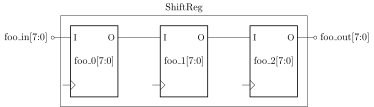
In this exercise, you will be implementing a component that manages shift registers. This component provides the following method to dynamically add a shift register:
def addReg(name: String, width: BitCount, delay: Int): (Bits, Bits)
This methods adds a new shift register to the component containing delay
width-bit registers in cascade. The name argument can be used to generate
readable names for all created I/O ports and registers. The return value of this
method is a 2-tuple where the first element is an input connected to the first
register in the cascade and the second element an output connected to the last.
The method getReg should return the same tuple.
As an example, the image below shows the configuration of the component after calling
addReg("foo", 8 bits, 3)|
In this case, the tuple returned would be (foo_in, foo_out).
SpinalHDL globally keeps track of the "current component". Whenever a new
instance is created of a Component subclass, the current component is set to
this instance. When logic is created, it is added to the current component. This
means that if logic is created inside the addReg method, it will be added to
the component that called this method, which is not what we want. To solve this,
SpinalHDL offers the rework method which can be called on a Component to add
logic to it after its creation:
class ExtendableComponent extends Component {
  def addLogic(): Unit = {
    rework {
      // Add logic here
    }
  }
}
The logic for this exercise should be implemented in ShiftReg.scala and the
simulation can be run using the ShiftRegSim object in Top.scala. The
simulation adds two registers (see method createShiftReg) and runs for 10
cycles, setting the input of the first register to increasing values starting at
0, and the input of the second register to decreasing values starting at 10.
Find the generated VCD file and examine it in GTKWave to confirm that your
implementation works as expected.